
Get the photos you're never in.
Ask anyone for the photo they took of you. They don't need the app. Keep everything in albums, and decide who sees what.
Or use it on the web. Free to start.
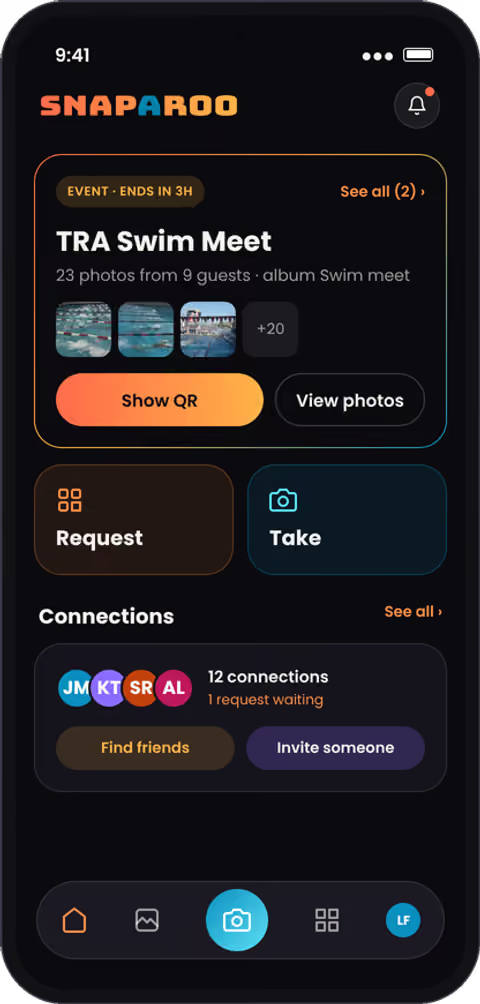
You took 400 photos at the swim meet.
You're in none of them.
The best photos of you are on someone else's phone. Snaparoo is how you get them, without a group chat, a shared drive, or chasing anyone.


Ask anyone. No app needed.
Send a link or show a QR code. They tap it, pick the photo, and it lands in your Library. They never have to download a thing.
- Works from a text, an email or a QR code
- They can keep a copy too, if you let them
- Links end on their own, so nothing stays open
One QR code. Everyone's photos in one album.
Swim meets, birthdays, team games, weddings. Put up one code and every parent, guest or teammate adds their shots to the same album, live, until the event ends.


Share by album. Change your mind anytime.
Every photo starts private. Put it in an album to share it with your connections, a few people, or anyone with a link. Stop sharing with one tap.
A feed of your people. No comment sections.
See the photos your connections share, react with a tap, and ask for a copy of any shot you're in. No strangers, and no arguments in the comments.

How it works
- 1Snap itTake a photo in Snaparoo. It saves to your Library, just for you.
- 2Send it or ask for itSend to a connection, or ask anyone for their photo with a link or QR code.
- 3Share by albumPut photos in an album to choose exactly who sees them.
Questions
Is there an app?
Yes. Snaparoo is free on iPhone and Android, and it also works in any browser. The people you request photos from don’t need either.
Does the other person need an account?
Not to take a photo for you, and not to open a view link. They need a free account to keep photos you send them in Snaparoo, or to connect with you.
Are my photos public?
Not unless you choose. New photos are visible only to you, and you decide who else sees each album.
What happens to a photo someone sends me?
Keep it, save it to your camera roll, or pass. Sends nobody acts on expire after 72 hours.
Can a photo be in more than one album?
Yes. Albums hold references, so the same photo can sit in as many as you like. Take it out of one and it stays in the others and in your Library.
What happens if I delete an album?
The album goes away; the photos stay in your Library. Deleting a photo is different: it removes it from every album.
Can I request a copy of a photo in my Feed?
Yes. Tap Request on the photo. The owner approves, and the photo appears in your Library.
Can I share a photo to another app?
Yes, on iPhone, with the share button and your phone’s share sheet.
How much does it cost?
Snaparoo is free. You can keep up to 200 photos and have up to 100 sends waiting. Your usage is always shown in the app.
Who can use Snaparoo?
Anyone 13 or older.
More answers on the questions page.

Your photos, your call.
Private until you share. We only notify you about your photos. No marketing, ever.
Bring Snaparoo to your next event.
Free on iPhone, Android and the web.